astrimid - It feels like I'm fighting LLM again...
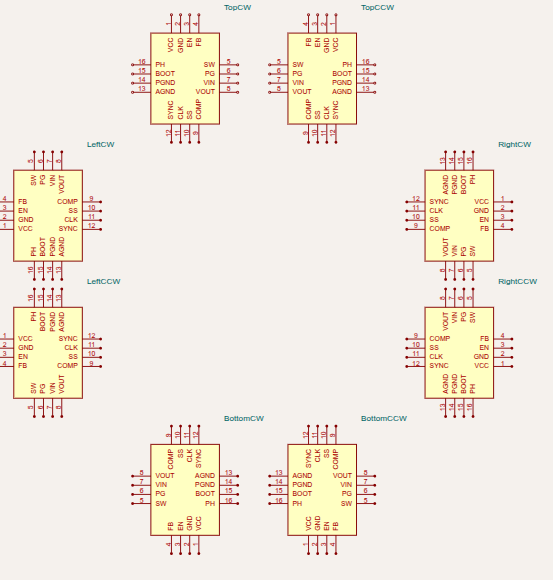
It feels like I'm fighting LLM again. This is schPinArrangement property of <chip : code sample When I ask LLM to do counter clockwise, it seems to change both direction to "right to left" and reverse pins in a list. Is there a prompt that makes it do either pin reversal or chang
It feels like I'm fighting LLM again. This is schPinArrangement property of `<chip>`:
```
topSide: {
direction: "left-to-right" as const,
pins: [
"CS1", // Pin 1 (leftmost)
"VFB1", // Pin 2
"VREG3", // Pin 3
"VFB2", // Pin 4
"CS2", // Pin 5 (rightmost)
"TP", // Pin 21
],
},
```
When I ask LLM to do counter clockwise, it seems to change both direction to "right-to-left" and reverse pins in a list. Is there a prompt that makes it do either pin reversal or change direction?
A
astrimid
Ok, LLM can generate a prompt, but can't follow it 😩 :
```
For the counter-clockwise layout, keep pins in ascending order (Pin 1, 2, 3, 4, 5)
and use the direction property to control placement:
- Top side: direction "right-to-left" (so Pin 1 appears on the left)
- Right side: direction "bottom-to-top" (so Pin 6 appears on top)
- Bottom side: direction "left-to-right" (so Pin 11 appears on the right)
- Left side: direction "top-to-bottom" (so Pin 16 appears at the bottom)
```
```
For the counter-clockwise layout, use direction "left-to-right" for all sides
and reverse the pin order:
- Top side: ["CS2", "VFB2", "VREG3", "VFB1", "CS1"] // Pin 5 to Pin 1
- Right side: ["DRVH2", "VBST2", "SW2", "PGOOD", "EN2"] // Pin 10 to Pin 6
- Bottom side: ["DRVL1", "VO1", "VREG5", "VIN", "DRVL2"] // Pin 15 to Pin 11
- Left side: ["EN1", "VCLK", "SW1", "VBST1", "DRVH1"] // Pin 20 to Pin 16
```
A
astrimid
it seems to overeager to help and uses both
A
astrimid
```
For the counter-clockwise numerical layout:
IMPORTANT: Choose EXACTLY ONE of these two methods, DO NOT combine them.
METHOD A (Recommended): Use direction only
- Keep ALL pins in ascending order (Pin 1, 2, 3, 4, 5)
- Use ONLY the direction property to position them
- DO NOT reverse the pin order in the pins array
Top side: direction "right-to-left" → pins: ["CS1", "VFB1", "VREG3", "VFB2", "CS2"]
Right side: direction "bottom-to-top" → pins: ["EN2", "PGOOD", "SW2", "VBST2", "DRVH2"]
Bottom side: direction "left-to-right" → pins: ["DRVL2", "VIN", "VREG5", "VO1", "DRVL1"]
Left side: direction "top-to-bottom" → pins: ["DRVH1", "VBST1", "SW1", "VCLK", "EN1"]
OR
METHOD B: Use pin order only
- Keep ALL directions as "left-to-right" (or "top-to-bottom")
- Reverse ONLY the pin order in the pins array
- DO NOT change the direction properties
Top side: direction "left-to-right" → pins: ["CS2", "VFB2", "VREG3", "VFB1", "CS1"]
Right side: direction "top-to-bottom" → pins: ["DRVH2", "VBST2", "SW2", "PGOOD", "EN2"]
Bottom side: direction "right-to-left" → pins: ["DRVL1", "VO1", "VREG5", "VIN", "DRVL2"]
Left side: direction "bottom-to-top" → pins: ["EN1", "VCLK", "SW1", "VBST1", "DRVH1"]
CONFIRM: You are using ONLY Method A OR ONLY Method B, not both.
```
A
astrimid
ok. this might be correct prompt for top pins, but completely wrong for bottom pins
A
astrimid
It feels like I would specify it much faster manually.
Seve
what model are you using
Seve
we could try to improve the API to something that makes less mistakes
Seve
CC <@809856037376491570> related to some stuff you're doing
A
astrimid
this prompt seem to work
```
Create a counter-clockwise pin arrangement for a {PACKAGE_TYPE} package where Pin 1 is at the top-left corner.
Package details:
- Total pins: {TOTAL_PINS} (including thermal pad if applicable)
- Pins per side: {PINS_PER_SIDE}
- Pin 1 location: top-left corner
- Thermal pad pin: {THERMAL_PIN_NUMBER} (if applicable, placed after the last pin on the top side)
IMPORTANT: Follow Method A ONLY (do not combine with Method B).
Method A (use direction property to control placement, keep pins in ascending order):
For each side, use the direction property to position pins correctly:
Top side:
- direction: "right-to-left"
- pins array: [{PIN_1}, {PIN_2}, ..., {PIN_N}, {THERMAL_PIN}]
- This places Pin 1 on the LEFT and Pin N on the RIGHT
- Thermal pad (if present) goes after Pin N
Left side:
- direction: "top-to-bottom"
- pins array: [{PIN_N+1}, {PIN_N+2}, ..., {PIN_2N}]
- This places Pin N+1 on TOP and Pin 2N on BOTTOM
Bottom side:
- direction: "left-to-right"
- pins array: [{PIN_2N+1}, {PIN_2N+2}, ..., {PIN_3N}]
- This places Pin 2N+1 on the LEFT and Pin 3N on the RIGHT
Right side:
- direction: "bottom-to-top"
- pins array: [{PIN_3N+1}, {PIN_3N+2}, ..., {PIN_4N}]
- This places Pin 3N+1 on BOTTOM and Pin 4N on TOP
CRITICAL RULES:
1. DO NOT reverse the pin order in the pins array - keep them in ascending order (1,2,3,4,5...)
2. ONLY use the direction property to control visual placement
3. The resulting layout should have Pin 1 at top-left and go counter-clockwise: Top → Left → Bottom → Right
4. Pin numbers should be in ascending order around the package
Generate the schPinArrangement object with these specifications.
```
A
astrimid
I'm using deepseek
A
astrimid
maybe there's a simple clockwise and counter-clockwise pin arrangement preset for qfn chip footprint?
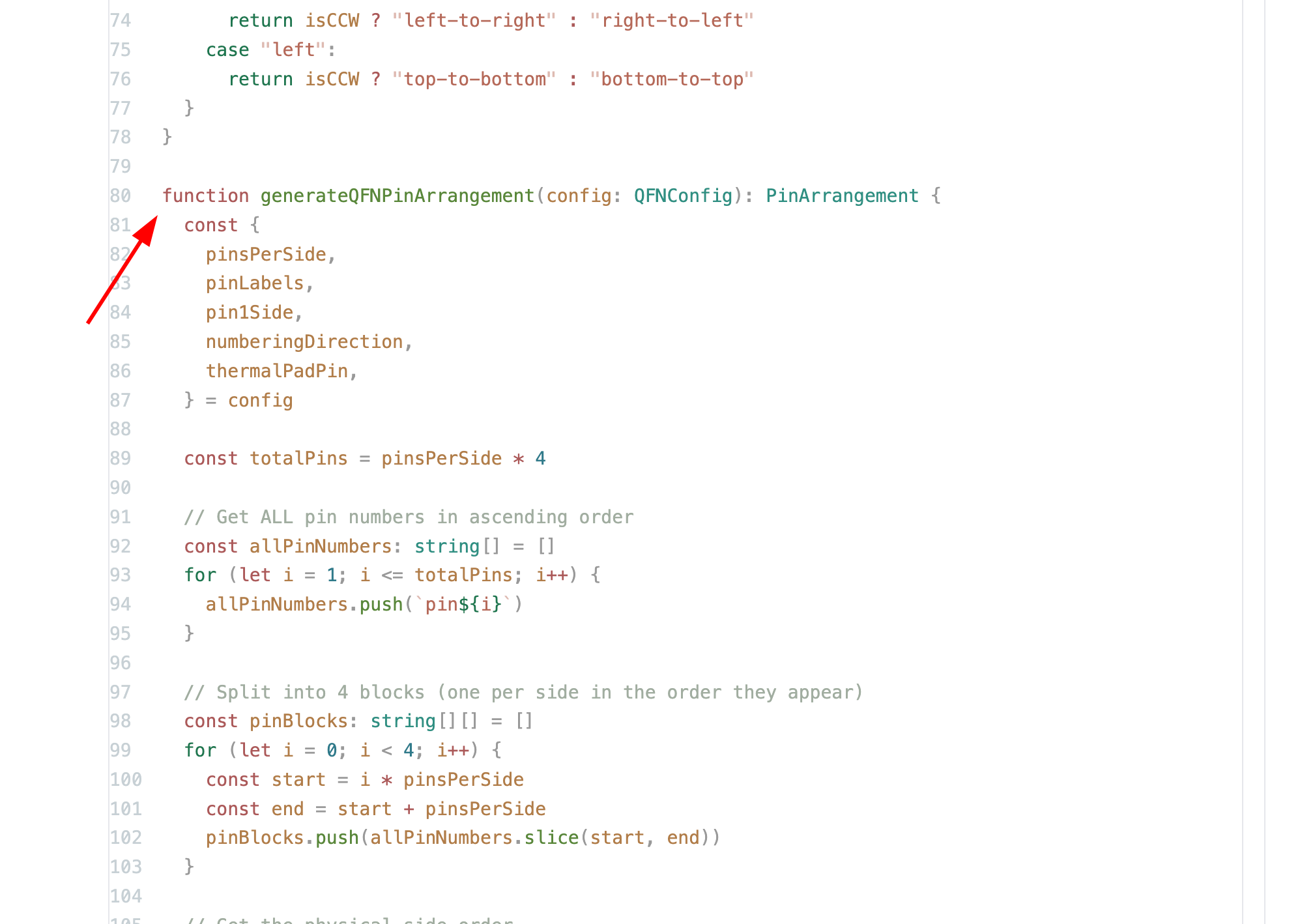
Maybe this API:
```
interface QFNConfig {
pinsPerSide: number
pinLabels: Record<string, string>
/**
* The corner where Pin 1 is located.
* This ALONE determines the orientation.
*/
pin1Corner: "top-left" | "top-right" | "bottom-right" | "bottom-left"
/**
* Direction of pin numbering around the package.
* This ALONE determines the order.
*/
numberingDirection: "counter-clockwise" | "clockwise"
thermalPadPin?: string
}
```
OTOH, maybe schRotation is better for pin1Corner?
A
astrimid
Thinking a bit more, pin1corner is a bit confusing, maybe pin1side is better:
```
const schPinArrangementRightCounter = generateQFNPinArrangement({
pinsPerSide: 4,
pinLabels: pinLabels16,
pin1Side: "right",
numberingDirection: "counter-clockwise",
})
```
A
astrimid
My first package:
https://tscircuit.com/astrimid/qfn-numbering-direction/blob/index.tsx
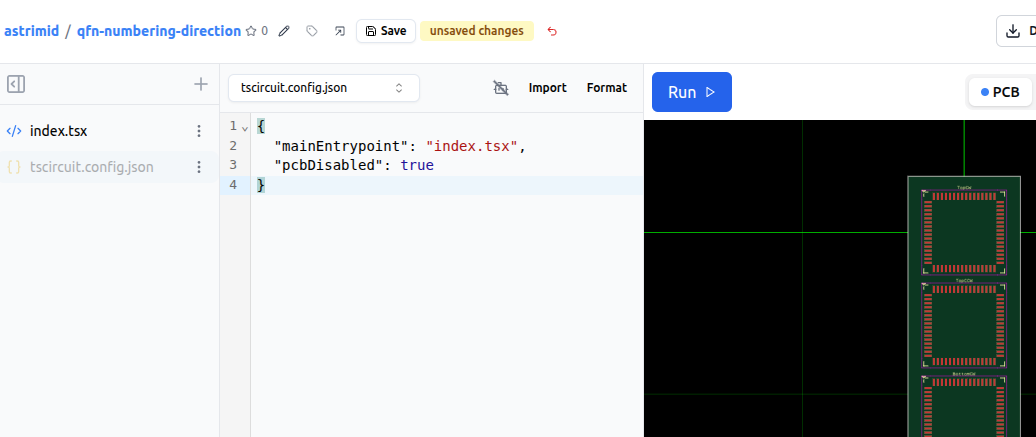
Is there a way to mark it as an API package?
No, I am adding a fix. `pcbDisabled` isn't a supported flag in `tscircuit.config.json` . I am adding that support
A
astrimid
This appears to work:
export default {
platformConfig: {
pcbDisabled: true
}
}
A
astrimid
using *.ts
R
Rishabh
Okay, but the `tscircuit.config.json` should be working as well in sometime
A
astrimid
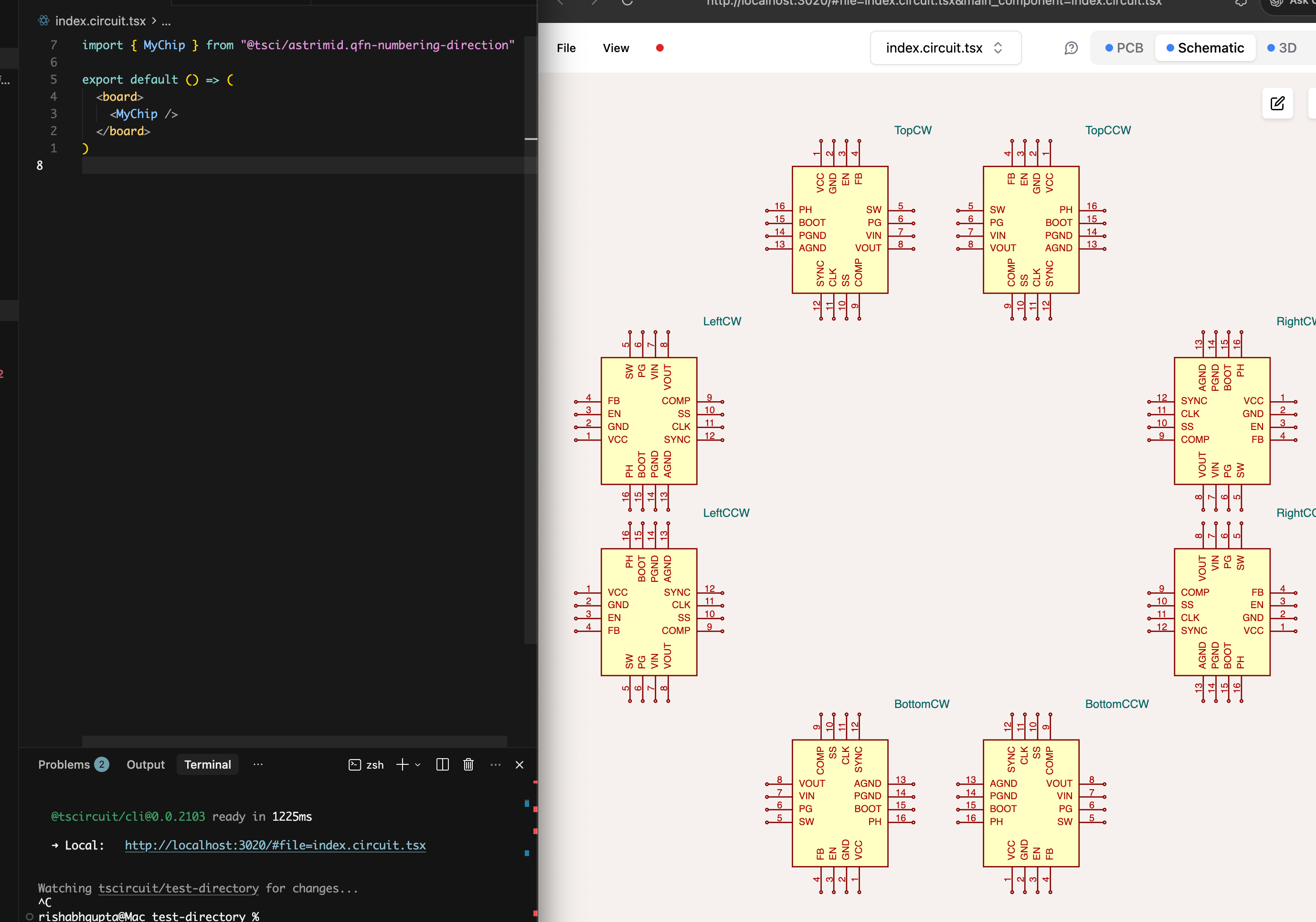
Okay. So, I've created a package, but how do I import it? `import { generateQFNPinArrangement } from "astrimid/qfn-numbering-direction"` doesn't seem to work?
Should there be some package.json ?
import { MyChip } from "@tsci/astrimid.qfn-numbering-direction"
A
astrimid
Thanks, it works!
Could you also help with
```
export { generateQFNPinArrangement, MyChip };
export type { QFNConfig, SchematicPinArrangement }```
This seem to generate cryptic error
A
astrimid
```
Execution Error:Error evaluating "entrypoint.tsx": Cannot read properties of undefined (reading '0')
at importLocalFile (blob:https://tscircuit.com/5fa13c9c-631c-41ef-887a-dcdc1228d044:955:2290)
at async importEvalPath (blob:https://tscircuit.com/5fa13c9c-631c-41ef-887a-dcdc1228d044:973:743)
at async Object.executeWithFsMap (blob:https://tscircuit.com/5fa13c9c-631c-41ef-887a-dcdc1228d044:1007:729596)
@tscircuit/eval@0.0.1030 • @tscircuit/core@0.0.1474
```
A
astrimid
Ok, it seems I can't export just a function, I must export a function and a component